If a check is not reconciled, you can void it. When you void a check or EFT transaction, Voyager creates a new record with a negative amount to back out the check or EFT payment. The word voider appears to the right of the transaction date for the new record, with the control number of the voided record. The word voided appears to the right of the transaction date for the voided record, with the control number of the voider record.
 |
The term ACH (Automated Clearing House) is sometimes used interchangeably with EFT (Electronic Funds Transfer) in Voyager. For more information about using EFT, see the Voyager Electronic Banking User's Guide.
|
|
1
|
In the screen for the check or EFT record you want to void, click Void. Voyager asks you for confirmation.
|
|
|
If you are using Voyager Construction and Job Costing, select Payable (JC) > Checks > Void Checks.
|
|
|
See “To review a check or EFT payment” for information about locating a check or EFT payment record.
|
|
2
|
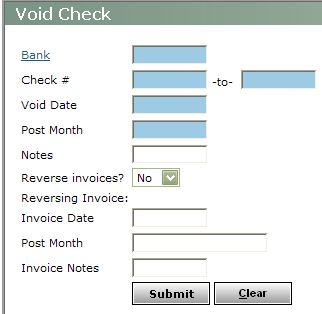
Bank Type or select the code fo the bank.
Check # Type the range of check numbers. Enter the same number in both fields to void a single check.
Void Date Type the date you want to record the check or EFT payment as being voided (mmddyy).
Post Month Type the month in which you want the voiding transaction to affect the G/L (mmyy).
Reverse Invoices To reverse invoices paid by this check or EFT payment, select Yes. If you do not want to reverse the invoices, select No.
Invoice Date If you selected Yes for Reverse invoices, Voyager will create a new invoice to back out each original invoice covered by the check. Type the date for the reversing invoices (mmddyy). If you leave this field blank, Voyager uses the dates of the invoices you are reversing.
Post Month Type the month you want the reversing invoices to affect the G/L (mmyy). If you leave this field blank, Voyager uses the post months of the invoices you are reversing.
Invoice Notes Type notes for the reversing invoice.
|
4
|
Click Submit. Voyager voids the check or EFT payment. If you selected Reverse Invoices, Voyager reverses all invoices for which the check was written.
|